


Universal Smart LCD Remote Car Key For BMW Mercedes Benz Audi Lexus Hyundai Nissan Ford Toyota Land Rover Cadillac Keyless Entry
Universal Smart LCD Remote Car Key For BMW Mercedes Benz Audi Lexus Hyundai Nissan Ford Toyota Land Rover Cadillac Keyless Entry
SPECIFICATIONS
Brand Name: YIQIXIN
Choice: yes
Country/Region of Car Manufacture: China
Customization: No
Fit 1: LCD Key For Alfa Audi Bmw Buick
Fit 10: For Land Rover Fiat Hyundai Honda Toyota
Fit 2: Smart Key LCD For Ford Honda Hyundai Kia
Fit 3: For Mitsubishi Nissan Opel Porsche Smart Key LCD
Fit 4: Universal LCD Screen Key For Suzuki Ssangyong Toyota Lexus
Fit 5: Universal LCD Screen Key For Volvo Universal LCD Screen Key For Volvo VW Seat Skoda
Fit 6: For BMW E90 E92 E93 E38 E39 E46 E65 E64 E66 Remote Car Key
Fit 7: Remote Car Key For Mercedes Benz GLC CLA AMG BGA NEC R CL GL
Fit 8: For Peugeot Citroen Saab Renault Modified LCD Remote Smart Car Key
Fit 9: For Chrysler Cadillac Chevrolet Fiat Modified LCD Remote Smart Car Key
High-concerned chemical: None
Interchange Part Number: Smart LCD Key For Audi BMW Buick
Manufacturer Part Number: Comfort Entry Keyless Entry
Material: LCD Key
Name: SK-03 Smart LCD Key
OEM NO.: Modified Smart Remote Car Key For Nissan Renault Toyota Lexus
Origin: Mainland China
Other Part Number: Universal Smart Remote Car Key
R/C Function: WithOut
Wireless Function: No
Universal Smart LCD Remote Car Key For BMW Mercedes Benz Audi Lexus Hyundai Nissan Ford Toyota Land Rover Cadillac Keyless Entry
Note:NO Car Logo sticker TO SEND!!!
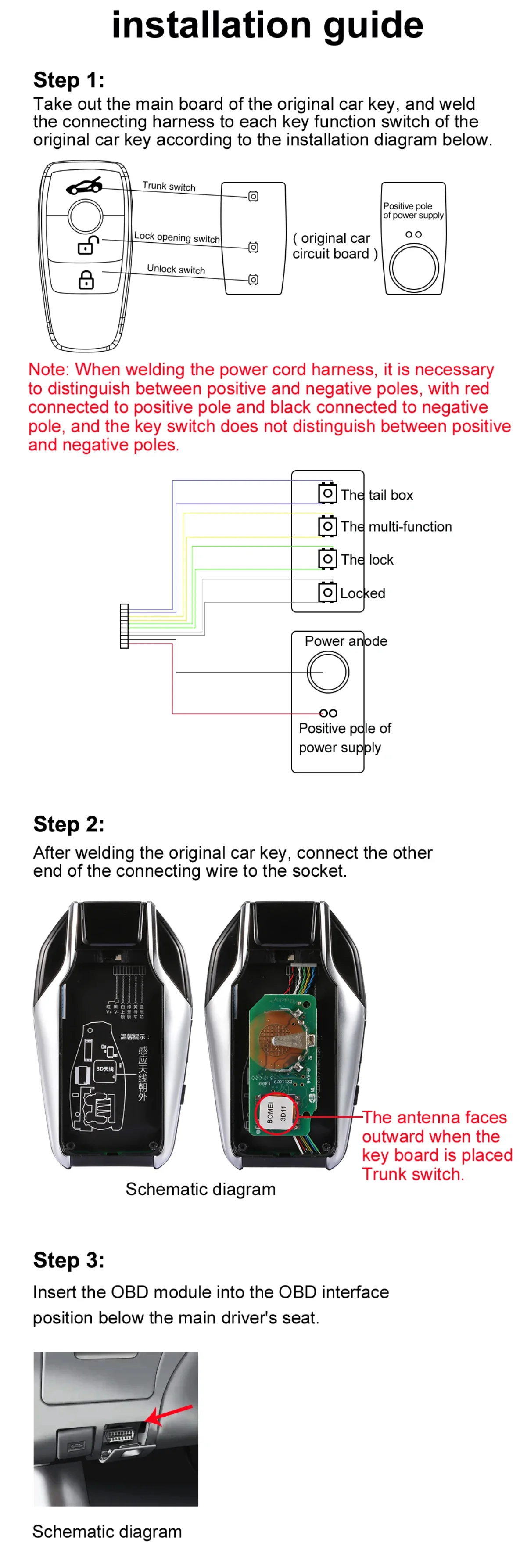
Installation:Solder the original key circuit board to the LCD key. (Refer to the manual for details),It is advisable to take it to a mobile phone repair shop and have a professional use soldering tools to perform the soldering.
Note that the LCD key must only use the original cable provided to the buyer. Do not use other cables to prevent product damage.
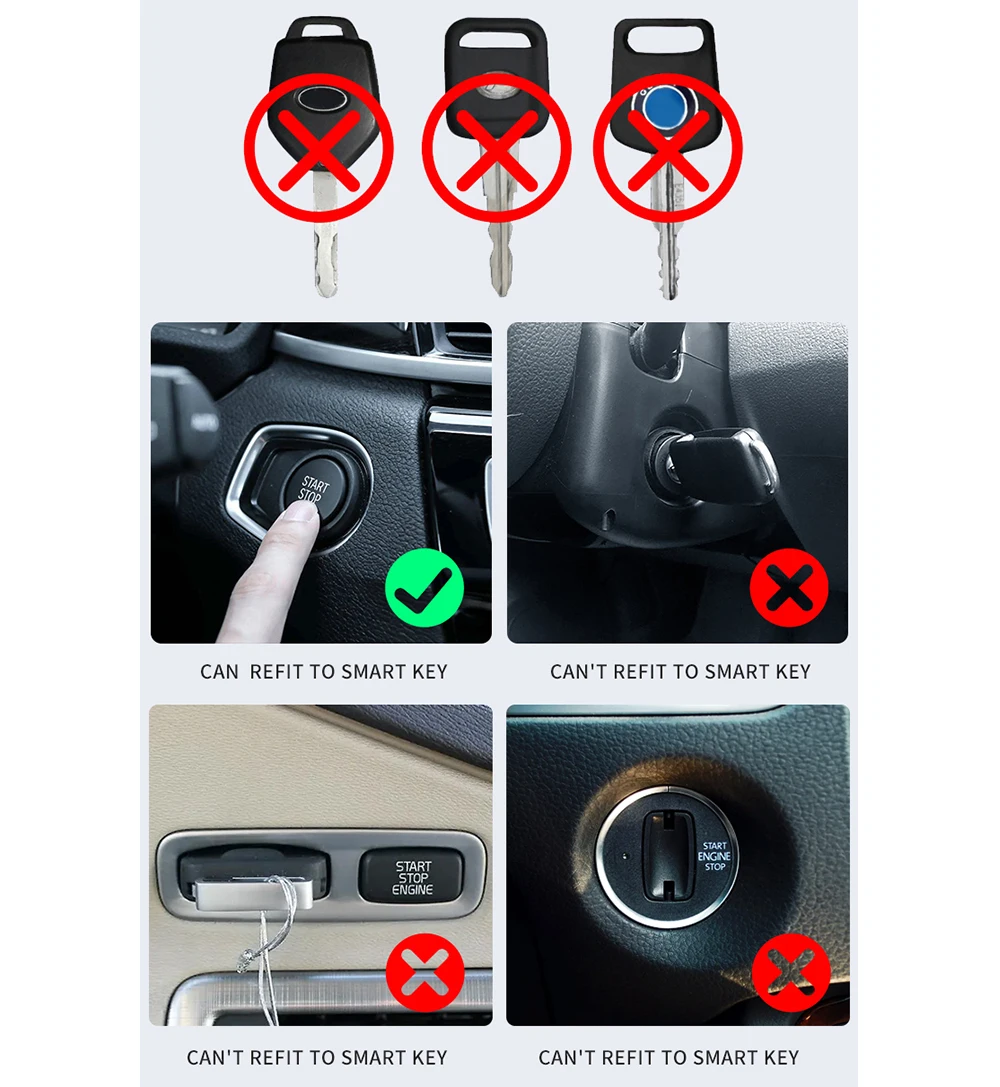
Important Notice: Please read the Ordering Manual before purchasing to avoid returns or exchanges. The Ordering Manual is designed to minimize the time required for returns or exchanges.
Ordering Manual:
A: Can the store's smart LCD key replace the original car key for controlling my vehicle?
Three conditions must be met: 1. Your vehicle must have factory-installed one-touch start functionality to be compatible with the smart LCD key. This must be the factory-installed one-touch start function, not one added through modification.
2. You must disassemble the original car key, remove the circuit board from the original key, and solder the circuit board to the LCD key's wiring harness. The soldering must be done correctly and without errors to ensure the LCD key can perform the functions of the original key's circuit board.
3. The LCD key only serves to change the appearance; it relies on the functions of the original car key circuit board. Therefore, before welding, you must use the original car key circuit board to open and close the car to test its functionality. If the original car key circuit board is ineffective, welding it to the LCD key will not work.
B: How do I solder the original car key circuit board to the smart LCD key's wiring harness?
1. I do not recommend that users attempt soldering themselves. It is advisable to take it to a mobile phone repair shop and have a professional use soldering tools to perform the soldering.
2. When soldering, please carefully read the instructions, which explain how to solder. Do not solder the positive and negative terminals incorrectly, as this will render the key inoperable. Many users lack welding experience and may accidentally damage the original car key circuit board due to unstable hands. Therefore, it is recommended to take it to a mobile phone repair shop for professional welding and avoid attempting it yourself.
3. Before removing the circuit board from the original car key for welding, it must be tested to ensure it can normally control the car, including turning it on and off, and that the functions are operational before proceeding with welding. Many customers bring in non-functional original key circuit boards for welding. The smart LCD key only changes the appearance; its functionality depends on the original car key circuit board, which is the core component controlling the vehicle. If the circuit board is non-functional, successful welding will be ineffective.
C: Can the smart LCD key enable all functions of the original car key circuit board?
The LCD key has only three wiring harnesses, meaning it can only activate three functions on the circuit board. Any additional functions on the circuit board cannot be activated due to the inability to weld them. You will need to make a choice.
D: Can the smart LCD key change the wallpaper on the screen or customize the car logo?
None of the smart LCD keys have this functionality. The screen wallpaper is fixed and cannot be customized, nor can the car logo be customized.
E: My car has a one-button start function, but my original car key does not. Can the smart LCD key modify the function to enable the one-button start feature on my original car key?
The one-button start function is a method of starting the vehicle without inserting a traditional key. Simply carry the original car key into the vehicle, and the car will detect it. Pressing the one-button start button on the car will start the engine. Therefore, the one-touch start function is merely a feature on the car; it is a switch on the car. The car key states “no one-touch start function.” Some car brands' keys have a remote start function; pressing the remote start function on the key triggers the car's one-touch start function switch to activate. You must have the original car key with remote start functionality. You can only use our LCD key to modify the appearance; it is impossible to obtain remote start functionality through the LCD key.
F: How do I adjust the text on the smart LCD key to my local language?
Swipe up to unlock the screen - swipe right to find the settings - enter the settings and find the language settings - click to find the language you want.
G:Product Power-On Issues
1. When first receiving the LCD key, do not rush to power it on. Charge the LCD key for 24 hours to fully charge the battery before powering it on. This ensures the product will not experience power-on failures.
H:Charging Cable Restrictions
1. Do not use fast-charging cables. The LCD key's circuitry technology is relatively outdated and cannot support fast-charging cables. Using such cables may damage the internal circuit board, rendering the product unusable.
2. Note that the LCD key must only use the original cable provided to the buyer. Do not use other cables to prevent product damage.


Couldn't load pickup availability
8876 in stock
View full details


